
Why Is My Turntable So Quiet? 9 Causes and How to Fix Them
Introduction
You put on a record, lower the stylus, turn up the volume—and barely hear anything.
The turntable is spinning, the stylus is tracking the record, and you can hear a faint version of the music, but the sound coming through your speakers is much quieter than expected.
If that sounds familiar, don't assume your turntable is broken.
A quiet turntable is a common setup problem, especially when a turntable is connected to audio equipment with different input and output requirements. In many cases, the issue comes down to the signal path: the low-level signal from the cartridge isn't being properly converted to a line-level signal before it reaches your amplifier or powered speakers.
One of the most common causes is a missing phono preamp or an incorrect PHONO/LINE setting. But speaker type, amplifier inputs, volume settings, cable connections, Bluetooth volume, and other parts of the signal chain can also affect what you hear.
This guide walks you through the problem from the simplest checks to the less common ones, so you can identify the cause without randomly replacing equipment.
Quick Answer: Why Is My Turntable So Quiet?
If your turntable is playing but the volume is extremely low, start by checking the signal path—especially the phono stage and PHONO/LINE setting.
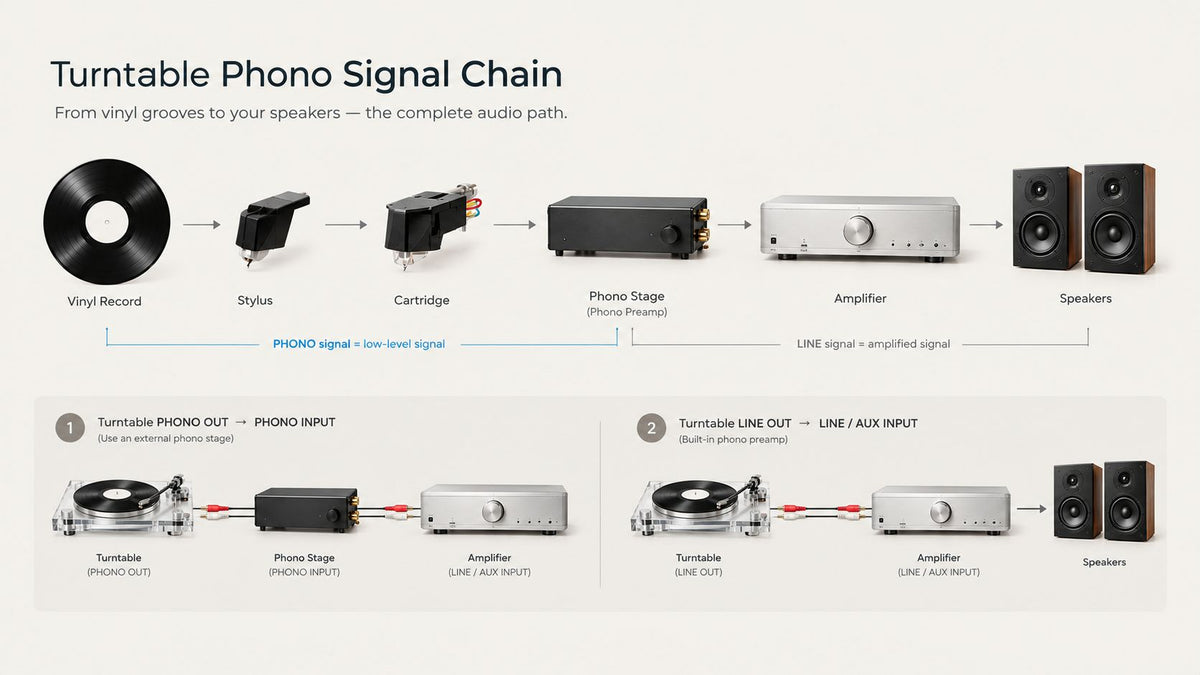
A turntable cartridge produces a much lower-level signal than typical line-level sources such as a phone, streamer, CD player, or DAC. That signal normally needs the appropriate phono-stage processing before it reaches a standard line-level input on an amplifier or powered speakers.
For example, if your turntable only provides a phono-level output and your powered speakers accept only a standard line-level input, the signal path needs to be:
Turntable → Phono Preamp → Powered Speakers
If your turntable has a built-in phono preamp, you may be able to use:
Turntable set to LINE → Powered Speakers
Some turntables also connect directly to an amplifier or receiver with a dedicated PHONO input:
Turntable set to PHONO → Receiver PHONO Input → Speakers
The correct setup depends on which part of the signal chain provides the phono stage. The goal is to have the appropriate phono-stage processing in the signal path—without leaving it out or using it twice.
Start With These Five Checks
Before changing anything else, ask:
-
Is the volume low on every record, or only one record?
-
Does my turntable have a built-in phono preamp?
-
Is its output set to PHONO or LINE?
-
Am I connecting to a PHONO input or a standard LINE/AUX input?
-
Are my speakers powered, or do they require an amplifier?
These five checks can quickly narrow down the cause of a low-volume turntable system and help you avoid replacing equipment you may not actually need.
1. Your Turntable May Need a Phono Preamp
To understand why a turntable can sound so quiet, it helps to understand what happens before the music reaches your speakers.
A Turntable Cartridge Does Not Normally Produce a Standard Line-Level Signal
When the stylus traces the groove of a record, its movement is converted by the cartridge into a small electrical signal.
This is a low-level phono signal, commonly referred to as a phono-level signal.
It is much lower than the line-level signal expected by most audio equipment, and it also requires RIAA playback equalization to restore the tonal balance intended for the record.
That's the job of a phono preamp, sometimes called a phono stage.
A phono preamp does two important things:
-
Amplifies the cartridge's low-level signal to line level
-
Applies the proper RIAA playback equalization
Without that stage, you may still hear music—but it can be extremely quiet and tonally unbalanced.
The Classic Beginner Setup Mistake
Imagine you've bought a turntable and a pair of powered bookshelf speakers.
Both have RCA connectors, so it seems logical to connect them directly.
You play a record.
The music is there, but even with the speakers turned up, it's strangely quiet.
The cables aren't necessarily the problem. The turntable isn't necessarily defective.
The missing piece may simply be the phono stage.
If the turntable is sending an unprocessed PHONO-level signal into an ordinary LINE or AUX input, the speakers are receiving a signal far below the level they expect.
Where Can the Phono Preamp Be?
The good news is that you don't necessarily need to buy another box.
A phono preamp can be built into:
-
The turntable
-
An integrated amplifier
-
A stereo receiver
-
Some powered speakers with a built-in phono stage
-
A separate external phono preamp
You only need one phono stage in the signal path.
For example, a turntable with a built-in phono preamp can often connect directly to powered speakers when its output is set to LINE.
A traditional turntable without a built-in phono preamp needs another component to provide the phono stage, such as a receiver with a dedicated PHONO input or an external phono preamp.
How Do I Know If My Turntable Has One?
Look at the rear panel, specifications, or owner's manual.
Common clues include:
-
PHONO/LINE switch
-
LINE OUT
-
Built-in phono preamp
-
Built-in phono stage
-
RIAA preamp
If the turntable has a switch labeled PHONO / LINE, LINE mode generally means its internal phono preamp is active.
In that case, connect the turntable to a standard LINE/AUX input, not a PHONO input.
PHONO mode generally sends the lower-level cartridge signal for use with an external phono stage or a compatible PHONO input.
Always check the instructions for your particular model rather than assuming every manufacturer labels its controls in exactly the same way.
Match the Output to the Input
| Turntable output | Destination input | What to expect |
|---|---|---|
| PHONO | PHONO | Correct |
| PHONO | LINE/AUX | Very quiet |
| LINE | LINE/AUX | Correct |
| LINE | PHONO | May sound too loud or distorted |
2. Check the PHONO/LINE Switch
If your turntable has a built-in phono preamp, the next thing to check is often a small switch on the back.
It may not look important.
It is.
What PHONO Means
When a turntable is set to PHONO, it generally outputs a low-level phono signal intended for a dedicated PHONO input or an external phono preamp.
For example:
Turntable set to PHONO → Receiver PHONO input
or:
Turntable set to PHONO → External phono preamp → Amplifier
In this mode, the turntable's built-in phono preamp is typically bypassed.
What LINE Means
When a turntable is set to LINE, its built-in phono preamp is typically engaged.
The output is then suitable for standard line-level inputs such as LINE, AUX, or the input on powered speakers.
For example:
Turntable set to LINE → Powered speakers
or:
Turntable set to LINE → AUX input on amplifier

Why the Wrong Setting Makes a Big Difference
Suppose your turntable has a built-in phono preamp, but the switch is set to PHONO.
You then connect it to the AUX input on a pair of powered speakers.
The speakers expect a line-level signal, but the turntable is sending a much lower-level phono signal.
Result: very low volume.
In this case, switching the turntable to LINE may solve the problem immediately.
Don't Add Phono Processing Twice
There is an opposite mistake worth knowing about.
If a turntable is already set to LINE, its signal has already passed through a phono stage. Sending that line-level signal into a PHONO input applies another phono stage on top of it.
The result may be excessively loud, overloaded, distorted, or tonally incorrect.
A simple rule to remember:
PHONO → PHONO input
LINE → LINE/AUX input
If you use an external phono preamp:
PHONO → Phono preamp → LINE/AUX input
A Quick Check Before You Change Anything
If your turntable sounds unusually quiet, check these three things:
-
Look at the PHONO/LINE switch on the back of the turntable.
-
Check which input the RCA cables are connected to on your amplifier or powered speakers.
-
Make sure the two settings match: PHONO to PHONO, or LINE to LINE/AUX.
Once you understand this relationship, many low-volume vinyl problems become much easier to diagnose.
3. Make Sure You're Using the Right Kind of Speakers
Another common source of confusion is the difference between powered and passive speakers.
They may look similar from across the room, but they work very differently—and that difference matters when you're troubleshooting a quiet turntable.
Powered Speakers
Powered speakers—also called active speakers—have amplification built in.
They connect to electrical power and can accept an audio signal without requiring a separate power amplifier.
With the right turntable and signal path, the setup can be very simple:
Turntable with built-in phono preamp set to LINE → Powered speakers
This is one reason powered speakers are popular for apartment setups, bedrooms, offices, and first vinyl systems. You can build a stereo system without adding a separate receiver or integrated amplifier.
However, powered does not automatically mean phono-ready.
If your turntable is set to PHONO and your powered speakers only accept a standard LINE/AUX input, you'll still need a phono stage somewhere in the signal path:
Turntable set to PHONO → External phono preamp → Powered speakers
Some powered speakers have a built-in phono stage, in which case a turntable can connect to them directly when the setup is configured correctly.
Passive Speakers
Passive speakers do not contain the power amplifier required to drive the speakers.
Connecting a turntable directly to passive speakers will not create a functional vinyl system, even if you find adapters that physically connect the cables.
A typical passive-speaker system looks like:
Turntable → Phono stage → Amplifier → Passive speakers
Some of those functions may be combined.
For example, an integrated amplifier may include both a PHONO input and the power amplification needed to drive passive speakers:
Turntable → Integrated amplifier with PHONO input → Passive speakers
If the integrated amplifier does not have a PHONO input, you'll need a separate phono preamp:
Turntable → Phono preamp → LINE input on amplifier → Passive speakers
How Can You Tell Which Speakers You Have?
Powered speakers typically:
-
Require AC power
-
Have their own amplifier
-
Include audio inputs such as RCA, AUX, optical, or Bluetooth, depending on the model
-
May have controls for volume and other settings
Passive speakers typically:
-
Do not connect directly to AC power
-
Have speaker terminals rather than powered audio inputs
-
Require a separate amplifier or receiver
If you're not sure which type you have, check the model's specifications before buying additional equipment.
And remember: powered speakers do not necessarily have a built-in phono stage. The important question is not just whether the speakers are powered, but whether the complete signal path provides the phono processing your turntable needs.
4. Check the Input on Your Amplifier or Receiver
Sometimes the turntable and speakers are perfectly fine. The problem is simply where the RCA cable is plugged in—or which input you've selected.
PHONO and AUX Are Not the Same Input
On a traditional stereo receiver or integrated amplifier, you might see inputs labeled:
-
PHONO
-
AUX
-
CD
-
LINE
-
TAPE
-
MEDIA
Depending on the model, these inputs may serve different purposes and are not necessarily interchangeable.
A PHONO input is designed for the low-level signal from a compatible phono cartridge and includes the phono-stage processing needed for vinyl playback.
AUX, CD, LINE, and similar inputs generally expect a standard line-level signal.
So if your turntable is set to PHONO and you connect it directly to an AUX or LINE input, the volume can be extremely low.
Example A: Turntable Without a Built-In Phono Preamp
Use:
Turntable set to PHONO → PHONO input on receiver
Or:
Turntable set to PHONO → External phono preamp → AUX/LINE input
Example B: Turntable With a Built-In Preamp Set to LINE
Use:
Turntable set to LINE → AUX/LINE/CD input
You generally would not use the receiver's PHONO input in this configuration, because the turntable has already provided the required phono-stage processing.
Check the Receiver's Selected Source Too
This sounds obvious until it happens.
If your receiver has several inputs, confirm that the input selected on the front panel or remote matches the input you've physically connected.
Also check whether the receiver has settings such as:
-
Input-specific gain or level settings
-
Mute enabled
-
Speaker A/B selection
-
Zone controls
-
Balance settings
-
A separate master volume setting
These features vary by model, but modern receivers can have enough routing and control options that a simple source-selection mistake can look like a turntable problem.
Try a Quick Comparison
If possible, connect another known-working line-level source to the same AUX/LINE input and check whether it plays normally.
If the other source works but the turntable is still very quiet, the problem is more likely to be somewhere in the turntable's signal path—such as the PHONO/LINE setting, phono stage, cables, or cartridge.
This simple comparison can help you avoid replacing equipment before you've identified the actual cause.
5. Check Your Cables and Connections
If the signal path looks correct but the turntable still sounds unusually quiet, it's time to inspect the physical connections.
A useful first clue is whether both channels are equally quiet or only one channel is affected.
-
Both channels equally quiet: Start with the phono stage, PHONO/LINE setting, and input selection.
-
Only one channel is quiet: Check the RCA connections, cartridge wiring, speaker connections, and individual amplifier or speaker channels.

Start With the RCA Cables
Make sure each RCA plug is fully and securely connected.
A connector can appear attached while not making reliable electrical contact.
If the cables are removable, disconnect and reconnect them at both ends. Make sure the plugs are inserted into the correct left and right inputs.
If possible, test with another known-good RCA cable. This can help rule out a damaged or faulty cable.
What If Only One Speaker Is Quiet?
If only the left or right channel is affected, check:
-
Left and right RCA connections
-
Speaker cables and terminals
-
Cartridge lead wires
-
Balance controls
-
The affected speaker
-
The corresponding amplifier channel
You can sometimes isolate the problem by swapping the left and right RCA connections at the amplifier or powered-speaker input.
Before swapping anything, turn the volume down and stop playback.
Then compare what happens:
-
If the quiet channel moves to the other side, the problem is likely upstream of the amplifier or speaker input.
-
If the quiet channel stays on the same side, the problem is more likely farther downstream, such as the amplifier channel, speaker cable, or speaker itself.
This simple swap test can help you narrow down the faulty part without replacing equipment at random.
What About the Ground Wire?
A ground wire is important on many traditional turntable setups, but a missing or poor ground connection most commonly causes hum or buzz, rather than simply reducing the overall volume.
So if your main symptom is "the music is clean but extremely quiet," start with the phono stage and signal path before assuming grounding is the cause.
If you're hearing a noticeable hum or buzz—especially one that changes when you touch the tonearm or other metal parts of the turntable—grounding becomes a much more likely suspect.
6. Inspect the Stylus and Cartridge
If the connections and signal path are correct, the next place to look is the stylus and cartridge.
They are responsible for retrieving the information in the record groove and converting that mechanical movement into an electrical signal.
However, if both channels are clean and equally quiet, the phono stage and signal-path checks earlier in this guide are still more likely starting points. Stylus and cartridge problems become more important when the sound is weak, distorted, inconsistent, or different between channels.
Make Sure the Stylus Is Fully Seated
Some cartridges use a removable stylus assembly.
If that assembly has become partially dislodged, playback may be weak, distorted, inconsistent, or absent.
Don't force it into place. Follow the cartridge or turntable manufacturer's instructions for installation and replacement.
Check for Dust on the Stylus
A stylus can collect dust and fibers during normal playback.
A significant buildup can interfere with the stylus's contact with the record groove and affect sound quality.
If you inspect the stylus and see debris, use a stylus brush or cleaning product specifically designed for stylus care. Follow the cleaning direction and instructions recommended by the stylus or cartridge manufacturer.
Avoid pushing sideways against the cantilever. It is a delicate component and can be easily damaged.
Is the Stylus Worn or Damaged?
A worn stylus doesn't always present itself as simple low volume. More common symptoms can include:
-
Distortion
-
Mistracking
-
Increased sibilance
-
Reduced clarity
-
Channel imbalance or intermittent channel problems
But if your system has gradually begun sounding weaker or worse and the stylus has seen substantial use, it belongs on the troubleshooting list.
If you suspect physical damage, stop playing valuable records until you've inspected or replaced the stylus.
Check the Cartridge Lead Wires
At the back of many cartridges are four small wires connecting the cartridge to the tonearm.
If one becomes loose or loses contact, you may experience:
-
One missing channel
-
Reduced output
-
Intermittent sound
-
Hum
-
Unusual channel imbalance
These connectors are tiny and delicate. If you're not comfortable working around the cartridge, don't pull on them or try to remove them unnecessarily.
A careful visual inspection is better than creating a second problem while trying to solve the first.
If you need to remove or reconnect cartridge wires, follow the cartridge manufacturer's instructions or have the work done by a qualified technician.
7. Check Tracking Force and Tonearm Setup
Tracking force is the downward force the stylus applies to the record groove during playback.
It needs to be set correctly for the cartridge and stylus you're using.
Too Little Tracking Force Can Cause Poor Playback
If the tracking force is significantly below the cartridge manufacturer's recommended range, the stylus may not track the groove reliably.
Possible symptoms include:
-
Skipping
-
Mistracking
-
Distortion
-
Unstable playback
-
Channel inconsistencies
Low volume alone doesn't automatically mean your tracking force is wrong. But if you've recently installed a cartridge, adjusted the counterweight, or reassembled the turntable, it's worth checking the setup.
Don't Increase Tracking Force Just to Make It Louder
This is important.
Tracking force is not a volume control.
If your turntable is too quiet, don't keep increasing the tracking force in the hope that pressing the stylus harder into the record will produce more output.
Set the tracking force according to the cartridge or stylus manufacturer's recommended specification.
If the output is still too low after the tonearm is correctly set up, continue troubleshooting the electrical signal path instead.
Recheck the Tonearm After Moving Your Turntable
Turntables are mechanical devices, and their setup can change after being moved or adjusted.
If you've recently moved to a new apartment, rearranged your listening room, transported the turntable, replaced the cartridge or stylus, or changed the tonearm setup, confirm that everything is still correctly adjusted.
Depending on your model, that may include:
-
Counterweight position
-
Tracking force
-
Cartridge alignment
-
Anti-skate
-
Turntable level
Correct setup helps the stylus track the groove as intended and can prevent problems such as skipping, mistracking, distortion, and channel imbalance.
If your turntable suddenly became quiet after being moved or serviced, tonearm setup is worth checking—but don't treat tracking force as a way to increase volume.
8. Check the Volume Controls Throughout the System
Vinyl setups can contain more volume controls than you might expect.
Your turntable may not have a volume control at all, while your powered speakers, amplifier, receiver, Bluetooth device, or other equipment may have separate level controls.
Powered Speakers
If you're using powered speakers, check the speaker's volume level and make sure the correct input is selected.
Some systems remember different volume levels for different inputs.
For example, Bluetooth playback might be loud while the RCA input is set much lower.
If your speakers have an input-specific volume setting, make sure the level for the turntable input hasn't been reduced accidentally.
Receiver or Integrated Amplifier
If you're using a receiver or integrated amplifier, confirm:
-
Master volume
-
Mute
-
Selected input
-
Speaker output
-
Balance
-
Zone settings
These settings can affect what you hear even when the turntable itself is working correctly.
A useful comparison is to play another known-working source through the same amplifier and speakers.
-
If every source is quiet: Check the amplifier, speaker, or overall volume settings.
-
If only the turntable is quiet: The problem is more likely somewhere in the turntable's signal path, such as the phono stage, PHONO/LINE setting, input selection, or connections.
Bluetooth Turntables
If your turntable is connected wirelessly to Bluetooth speakers or headphones, check the volume on the receiving device as well as any available volume control on the turntable or source device.
Also confirm that you're actually connected to the Bluetooth device you intend to use.
In a home with several previously paired speakers or headphones, automatic reconnection can occasionally send audio to a different device than expected.
If Bluetooth playback remains unusually quiet, try a wired connection if your equipment supports one.
This can help answer an important diagnostic question:
Is the problem coming from the turntable itself, or only from the wireless connection?
If the wired connection plays at a normal level, the turntable is less likely to be the source of the problem.
9. One Record May Simply Sound Quieter Than Another
Not every difference in volume means there's a problem with your turntable.
Records can have different perceived loudness because they were recorded, mixed, mastered, or released differently. Different pressings and editions of the same album can also sound noticeably different.
You may notice this when comparing:
-
Older and newer pressings
-
Different editions of the same album
-
Different mastering versions
-
Records from different eras
-
Different release formats
A moderate difference in volume between records can be completely normal.
How to Test It
Choose two or three records you know well and play similar sections without changing the volume or other system settings.
Then ask:
-
Only one or two records sound quieter: The difference may simply be related to the recording, mastering, or pressing. Your turntable is less likely to be the cause.
-
Every record sounds extremely quiet: Focus on the playback system, especially the PHONO/LINE setting, phono stage, input selection, connections, and volume controls.
This is one of the simplest ways to separate a record-specific difference from a turntable or system-wide problem.
If your system plays most records at a normal level but one particular record is quieter, you may not need to change anything at all.
10. Why Can I Hear Music Directly From the Stylus?
This surprises a lot of first-time vinyl listeners.
You turn the speakers down—or even switch them off—and you can still hear a tiny, tinny version of the song coming from the turntable itself.
That can be completely normal.
The Stylus Is Physically Moving
Vinyl playback begins as a mechanical process.
As the record spins, the groove moves the stylus. That movement travels through the stylus and cartridge assembly, where it is converted into a small electrical audio signal.
At the same time, some of that mechanical vibration can be heard directly in the room.
It's usually faint and sounds thin or tinny compared with the amplified sound coming from your speakers.
But It Isn't a Substitute for Amplified Sound
Hearing a faint version of the music directly from the stylus does not mean your speakers are receiving the audio signal correctly.
If the turntable is producing this faint mechanical sound but your speakers are silent or extremely quiet, trace the electrical signal path:
Record groove → Stylus → Cartridge → Phono stage → Amplification → Speakers
The mechanical part of playback may be working normally while the electrical signal is being lost or reduced somewhere later in the chain.
Check the signal path step by step rather than changing several things at once. This makes it much easier to identify whether the problem is related to the phono stage, input, connections, amplifier, or speakers.
A faint sound from the stylus is therefore usually not a sign that the turntable is broken. It's simply a reminder that vinyl playback starts with a physical movement before that movement becomes the amplified sound you hear from your speakers.
11. A Step-by-Step Turntable Volume Troubleshooting Guide
If you want the fastest path to a solution, work through these steps in order. For other turntable problems, see our turntable troubleshooting guide.
Start with the simplest checks before changing equipment or adjusting the tonearm.

Step 1: Try More Than One Record
Test two or three records that you know well.
If only one sounds noticeably quieter, the difference may simply come from the recording, mastering, pressing, or edition.
If every record is extremely quiet, continue troubleshooting the playback system.
Step 2: Identify Your Turntable's Output
Check how your turntable is configured.
Does it have:
-
PHONO output
-
LINE output
-
A switchable PHONO/LINE setting?
If the turntable has a built-in phono preamp, confirm whether it is currently active.
For a switchable turntable, LINE generally means the built-in phono stage is engaged, while PHONO generally means the turntable is providing the lower-level phono signal.
Always check your model's manual if you're unsure how its switch works.
Step 3: Identify the Input You're Using
Look at the component receiving the turntable signal.
Are you connected to:
-
PHONO
-
AUX
-
LINE
-
CD
-
A standard RCA input on powered speakers?
Make sure the turntable's output mode matches the type of input you're using.
In general:
Turntable set to PHONO → PHONO input
Turntable set to LINE → LINE/AUX input
Step 4: Confirm That a Phono Stage Exists Somewhere
If your turntable is providing a phono-level signal, there must be a compatible phono stage somewhere in the signal path before that signal reaches a standard line-level input.
The phono stage may be built into:
-
The turntable
-
A receiver or integrated amplifier
-
Powered speakers
-
An external phono preamp
You need one—and only one—phono stage in the signal path.
If your turntable is set to PHONO and you're connecting it directly to a standard AUX or LINE input without any phono stage in between, you've likely found the cause of the low volume.
Step 5: Confirm Your Speakers Are Actually Amplified
If you're connecting a turntable directly to speakers, make sure they are powered speakers with a built-in amplifier.
Passive speakers require a separate amplifier or receiver.
A typical passive-speaker setup is:
Turntable → Phono stage → Amplifier → Passive speakers
Step 6: Check Every Volume and Source Control
Verify:
-
Input selection
-
Master volume
-
Mute status
-
Balance
-
Speaker output selection
-
Powered-speaker volume
-
Zone or other routing settings, if applicable
If possible, test another known-working source through the same amplifier and speakers.
If every source is quiet, the problem may be farther downstream in the amplifier or speaker system.
If only the turntable is quiet, return to the turntable's signal path.
Step 7: Reseat the Cables
Turn the volume down before reconnecting cables.
Reseat the RCA plugs and any removable connections, making sure the left and right channels are connected correctly.
If only one channel is affected, isolate the left and right channels systematically.
A known-good RCA cable can also help rule out a faulty connection.
Step 8: Inspect the Stylus and Cartridge
If the signal path and connections look correct, inspect the stylus and cartridge.
Look for:
-
Obvious dust or debris
-
A loose stylus assembly
-
Physical damage
-
Loose cartridge lead wires
Don't force delicate components into place. Follow the manufacturer's instructions if adjustment or replacement is needed.
Step 9: Verify Tonearm Setup
If you've recently moved the turntable, installed a cartridge or stylus, or changed the tonearm settings, verify:
-
Tracking force
-
Anti-skate
-
Cartridge alignment, where applicable
-
Turntable level
Use the specifications provided for your particular cartridge and turntable.
Remember that tracking force is not a volume control. Increasing it simply to make the music louder is not a valid fix.
Step 10: Test One Change at a Time
This is the part people often skip.
Don't change the cable, stylus, tracking force, speaker input, and phono setting all at once.
Change one variable, test the system again, and observe what changed.
That way, when the sound returns to normal, you'll know what actually fixed the problem.
What Your Results Usually Mean
Use the pattern of the problem to narrow down the cause:
| What you're experiencing | More likely cause |
|---|---|
| Only one record is quiet | Recording, mastering, pressing, or edition difference |
| Every record is extremely quiet | Signal-path or system-level issue |
| Only one channel is quiet | Cable, cartridge, connection, amplifier, or speaker channel |
| Turntable is quiet into AUX/LINE | Missing phono stage or PHONO/LINE mismatch |
| Turntable is loud or distorted into PHONO | Possible double phono-stage processing |
| Stylus is audible, but speakers are very quiet | Problem somewhere in the electrical signal path |
The goal isn't to replace equipment as quickly as possible. It's to identify where the signal level changes and fix that specific part of the system.
12. Turntable Signal Chains: Which Setup Do You Have?
A quick signal-chain check can often reveal the problem immediately.
Find the setup that most closely matches yours:

| Your Setup | Correct Signal Path | If It's Connected Incorrectly |
|---|---|---|
| Turntable without a built-in phono preamp + powered speakers | Turntable set to PHONO → Phono preamp → Powered speakers | Connecting the turntable directly to a standard LINE/AUX input can result in very low volume |
| Turntable with a built-in phono preamp + powered speakers | Turntable set to LINE → Powered speakers | Leaving the turntable in PHONO mode can result in very low volume |
| Turntable + receiver with a PHONO input | Turntable set to PHONO → Receiver PHONO → Passive speakers | Sending a LINE-level signal into the PHONO input can cause excessive volume or distortion |
| Turntable + amplifier without a PHONO input | Turntable set to PHONO → Phono preamp → Amplifier LINE/AUX → Passive speakers | Connecting a phono-level signal directly to LINE/AUX can result in very low volume |
| All-in-one record player | Turntable and amplification are usually integrated | Check the manufacturer's manual for the specific signal path and available inputs/outputs |
| Bluetooth turntable | Turntable → Bluetooth speaker, headphones, or receiver | Check Bluetooth pairing, receiving-device volume, and the selected output device |
The Key Rule
The exact equipment may vary, but the principle is simple:
If you're still unsure how these components fit together, see our guide to building a complete vinyl setup.
A phono-level signal needs one appropriate phono stage before it reaches a standard line-level input.
If your turntable already has a built-in phono preamp, you generally don't need another one.
And if your receiver or powered speakers already provide the phono stage, make sure the turntable's output mode is configured appropriately.
The labels on your particular equipment still matter, so use this table as a troubleshooting framework—not as a substitute for the owner's manual.
13. PHONO vs. LINE: The Difference That Solves Many Volume Problems
If there's one concept worth remembering from this guide, it's the difference between PHONO and LINE.
PHONO
A phono-level signal is the low-level signal produced by a phono cartridge or provided by a turntable's phono-level output.
It requires a phono stage with the appropriate amplification and RIAA playback equalization before it can be treated like a conventional line-level source.
LINE
A line-level signal has already been brought to the level expected by standard audio inputs.
Common line-level inputs include:
-
AUX
-
LINE
-
CD
-
Other compatible line-level inputs
The Simple Matching Rule
| Turntable Configuration | Connect To |
|---|---|
| Turntable set to PHONO | PHONO input or external phono preamp |
| Turntable set to LINE | AUX, LINE, CD, or compatible powered-speaker input |
| Turntable set to PHONO + external phono preamp | Phono preamp output → AUX/LINE |
The most important rule is simple:
PHONO → PHONO
LINE → LINE/AUX
If you use an external phono preamp:
PHONO → Phono preamp → LINE/AUX
Understanding this distinction helps you troubleshoot low volume, choose compatible equipment, and expand your vinyl system without guessing how the pieces fit together.
And remember: you need one appropriate phono stage in the signal path—not zero, and not two.
14. What If My Turntable Is Quiet Even With a Phono Preamp?
Suppose you've confirmed that your signal chain is correct:
Turntable → Phono preamp → Amplifier/speakers
But the output still seems unusually low.
At this point, it's worth looking beyond the basic PHONO/LINE setup and checking cartridge output, phono-stage compatibility, and gain.
Check Cartridge and Phono-Stage Compatibility
Not all cartridges produce the same output voltage, and not all phono stages are designed for every cartridge type.
The two broad cartridge categories you'll commonly encounter are:
-
Moving magnet (MM)
-
Moving coil (MC)
Many beginner and mainstream turntables use moving-magnet cartridges.
If you're using a separate phono stage, check that its input and gain settings are appropriate for your cartridge.
For example, a low-output MC cartridge connected to an MM-only input may produce a much lower signal than expected because the phono stage isn't providing the gain the cartridge requires.
However, cartridge output varies, so don't assume that every MC cartridge requires the same settings. Check the cartridge manufacturer's specifications and the phono stage's supported input types and gain ranges.
Check the Phono Stage's Gain Setting
Some external phono preamps provide adjustable gain.
If yours does, select a gain setting appropriate for your cartridge's output and follow the manufacturer's recommendations.
More gain is not automatically better.
Too little gain can leave the system quieter than expected, while too much gain can reduce headroom and contribute to overload or distortion.
The goal is proper gain matching, not simply choosing the highest setting.
Compare With Another Input Carefully
Your turntable doesn't necessarily need to play at exactly the same volume-control position as every digital source.
Different sources can have different output levels, so a small difference in volume is normal.
The important distinction is between:
“My turntable needs a small volume adjustment compared with another source.”
and:
“My turntable is barely audible even with the volume turned very high.”
The second situation strongly suggests a problem with the signal path, gain matching, or another part of the playback system.
Before replacing equipment, confirm the cartridge specifications, phono-stage settings, amplifier input, and connections.
15. Common Fixes That Usually Don't Solve a Quiet Turntable
Troubleshooting is partly about knowing what not to do.
Before buying new equipment or changing your setup, identify where the signal is actually being lost.
Buying New Speakers Immediately
If both channels are working but the turntable is extremely quiet, replacing the speakers without checking the phono stage or signal path may accomplish nothing.
First, verify:
-
PHONO/LINE setting
-
Input selection
-
Phono-stage configuration
-
Amplifier or powered-speaker volume
If other sources play normally through the same speakers, the speakers are less likely to be the cause.
Turning the Tracking Force Up
Tracking force is not a volume control.
Increasing it won't properly solve a low-volume problem and can put unnecessary stress on the record and stylus.
Use the tracking force recommended for your cartridge or stylus instead.
Replacing Every Cable
A faulty cable can certainly cause problems, particularly with:
-
One channel being silent or much quieter
-
Intermittent sound
-
Crackling or unstable connections
But if both channels are clean and equally quiet, check the PHONO/LINE configuration and signal path before buying a collection of new cables.
Assuming the Turntable Is Defective
A turntable can be functioning exactly as designed while producing a signal that the next component isn't prepared to accept.
For example, a turntable set to PHONO connected directly to a standard AUX or LINE input can produce very low volume without the turntable itself being defective.
Compatibility and configuration matter.
Adding Another Phono Preamp Without Understanding the Existing System
More amplification isn't automatically the answer.
If your turntable already has a built-in phono preamp and is correctly set to LINE, adding another phono stage isn't necessary.
Likewise, sending a LINE-level signal into another PHONO input can result in excessive gain, overload, distortion, or an incorrect tonal balance.
Before adding hardware, map the complete signal chain:
Turntable → Phono stage → Amplification → Speakers
Then identify where the phono stage is already being provided.
The goal is simple: diagnose the signal path before buying new equipment.
16. How Modern Turntables Make This Easier
Traditional vinyl systems often separate different functions into different components.
That can provide excellent flexibility and upgrade options, but it also creates more opportunities for setup mistakes.
Many modern turntables simplify the process by integrating some of those functions into the turntable itself.

A built-in phono preamp, for example, can allow a turntable to connect directly to compatible powered speakers when the turntable is set to LINE.
That can create a much simpler signal path:
Turntable with built-in phono preamp → Powered speakers
For listeners in apartments, smaller living rooms, bedrooms, and home offices, that simplicity can be valuable.
It means fewer components, fewer cables, and fewer decisions before you can put on a record.
An Example From AUDURA
AUDURA Pure, for example, includes a built-in phono preamp with selectable PHONO/LINE output.
When connecting it directly to compatible powered speakers through RCA, setting the turntable to LINE provides a straightforward setup because the turntable's built-in phono stage is handling the phono signal conversion.
If you're connecting it to a compatible system with a dedicated PHONO input, PHONO mode provides another option by sending the lower-level phono signal to the external phono stage.
AUDURA Core similarly provides built-in phono amplification with selectable LINE/PHONO functionality for different system configurations.
The point isn't that one configuration is universally better.
It's that understanding what each component is doing lets you choose the simplest signal path for your own space and equipment.
That's a useful principle whether you're using an AUDURA turntable or any other vinyl system: know where the phono stage is, match the output to the input, and keep the signal path as simple as your setup allows.
17. When Should You Ask for Professional Help?
Many low-volume problems are related to setup or signal-path configuration, but not every problem can be solved with a setting or cable check.
Consider contacting the manufacturer, a qualified audio technician, or your retailer if:
-
The turntable suddenly became much quieter without any setup changes
-
Both channels remain abnormally low after you've confirmed the phono stage and signal path
-
One channel repeatedly cuts out or becomes intermittent
-
The cartridge, tonearm, or other external components appear physically damaged
-
You suspect an internal connection or component has failed
-
The turntable's built-in phono preamp appears to be malfunctioning
-
You smell overheating electronics or notice unusual heat
-
The problem began after a drop, impact, power surge, or other electrical event
Don't Open Powered Equipment Unless You're Qualified
External checks such as inspecting cables, switches, input settings, and other user-accessible controls are generally appropriate.
However, don't open the turntable, amplifier, powered speakers, or other powered electronics unless you're qualified to service them.
Electronic equipment can contain components that present a shock or other safety hazard even when the problem seems minor.
If you've worked through the troubleshooting steps in this guide and the problem still isn't clear, getting professional help is often safer—and more efficient—than continuing to replace parts or adjust components at random.
A good troubleshooting process has a clear stopping point: know what you can safely check yourself, and know when to hand the problem to someone qualified.
18. A Simple Checklist Before You Buy Anything
If your turntable is too quiet, run through this checklist before ordering a new phono preamp, cartridge, amplifier, or speakers.
You may find that the problem is a setting, connection, or signal-path mismatch that can be fixed without buying anything.
Turntable Volume Checklist
- Tested more than one record
- Confirmed the turntable's PHONO or LINE output mode
- Confirmed whether the turntable has a built-in phono preamp
- Confirmed that a phono stage exists somewhere in the signal path
- Confirmed a PHONO-level output is connected to a compatible phono stage or PHONO input
- Confirmed a LINE output is connected to a LINE/AUX or other compatible line-level input
- Confirmed the speakers are powered, or that passive speakers are connected to an amplifier
- Checked speaker or amplifier volume
- Checked the selected input
- Checked mute, balance, speaker output, and other relevant controls
- Reseated the RCA cables and other accessible connections
- Inspected the stylus for obvious debris or damage
- Visually checked accessible cartridge connections
- Verified tracking force according to the cartridge or stylus manufacturer's specifications
- Tested a wired connection if the problem only occurs over Bluetooth
If you can check every box and the system is still abnormally quiet, you've narrowed the problem enough to make technical support much more useful.
If you're considering a simpler turntable setup, explore our turntables designed for different vinyl system configurations.
Instead of simply saying, “My turntable is quiet,” you can explain exactly which parts of the signal chain you've already checked.
For example:
“I tested three records, confirmed the turntable is set to LINE, connected it to the AUX input on my powered speakers, checked the volume and cables, and the output is still extremely low.”
That gives a manufacturer, retailer, or technician much more useful information to work with—and can help you get to the right solution faster.
Diagnose first. Buy second.
Frequently Asked Questions
Why is my turntable so quiet even at full volume?
The most common cause is a missing or incorrectly configured phono stage. If your turntable is sending a phono-level signal directly to a standard LINE or AUX input, the volume can be extremely low.
Check whether your turntable has a built-in phono preamp, whether its PHONO/LINE setting is correct, and whether your amplifier or powered speakers are using the appropriate input. Also confirm that passive speakers are connected to a suitable amplifier.
Do I need a preamp if my turntable is too quiet?
Possibly. If your turntable is outputting a phono-level signal and you're connecting it to a standard line-level input, you need one appropriate phono stage somewhere in the signal path.
That phono stage may already be built into your turntable, receiver, integrated amplifier, or compatible powered speakers, so you may not need to buy a separate preamp.
Why is my turntable quieter than Bluetooth?
Different audio sources can have different output levels, so some difference in volume is normal.
However, if your vinyl playback is dramatically quieter—for example, barely audible while Bluetooth plays normally—the turntable may be sending a PHONO-level signal to an input expecting LINE level. Check the turntable's output mode and the input you're using.
Should my turntable be set to PHONO or LINE?
Set the turntable to PHONO when sending its phono-level output to a compatible PHONO input or an external phono preamp.
Set it to LINE when the turntable's built-in phono preamp is active and you're connecting to a standard AUX, LINE, CD, or compatible powered-speaker input.
Always check your turntable's manual, because the available settings and labeling can vary by model.
Why can I hear the record from the needle but not the speakers?
The stylus physically moves as it follows the record groove, so hearing a faint, thin sound directly from the stylus area can be normal.
If you can hear that mechanical sound but the speakers are silent or extremely quiet, check the electrical signal path—especially the phono stage, PHONO/LINE setting, input selection, cables, amplifier, and speaker connections.
Can I connect a turntable directly to powered speakers?
Yes, if the signal is already at the appropriate line level and the powered speakers accept the corresponding input.
A turntable with an active built-in phono preamp can usually connect directly to compatible powered speakers through its LINE output. If the turntable only provides a phono-level signal, you'll need a phono stage before the powered speakers.
And remember: powered speakers do not automatically mean phono-ready.
Can I connect a turntable directly to passive speakers?
No, not in a conventional setup. Passive speakers require power amplification and cannot normally be driven directly by a turntable.
A typical system is:
Turntable → Phono stage → Amplifier → Passive speakers
Some receivers and integrated amplifiers combine the phono stage and power amplifier in one component, which can simplify the setup.
Can a dirty stylus make a turntable sound quiet?
Heavy debris on the stylus can interfere with proper groove contact and reduce playback quality.
However, if both channels are clean but dramatically quiet, a signal-chain or phono-stage problem is usually a more likely starting point than a dirty stylus. Inspect the stylus carefully and clean it only with a method appropriate for your cartridge or stylus.
If the stylus appears damaged, avoid continuing to play valuable records until you've confirmed that it is safe to use.
Final Thoughts
When a turntable is barely audible, it's easy to assume that something expensive has failed.
Usually, the better approach is to follow the signal.
Start at the record and work forward:
Record → Stylus → Cartridge → Phono stage → Amplification → Speakers
For many systems, the problem turns out to be somewhere in or around the phono stage and signal path: a missing phono preamp, a PHONO/LINE switch in the wrong position, or a phono-level output connected to an input expecting a line-level signal.
Once you understand how that part of the vinyl signal chain works, troubleshooting becomes much less intimidating.
You also become better equipped to build your next system, choose compatible speakers, decide whether you need an amplifier, or upgrade individual components without relying on trial and error.
If you're still getting familiar with how the pieces of a vinyl system work together, continue with our Complete Vinyl Record Player & Turntable Guide for Beginners. If the problem you're hearing is a hum or buzz rather than low volume, read How to Fix Turntable Hum: 12 Easy Checks for Buzzing & Noise next.
The goal isn't to make vinyl complicated.
It's to understand just enough about the system that the equipment gets out of the way—and you can get back to the record.

